Post 5: Creating ML2 Bootable USB Media (on Mac)
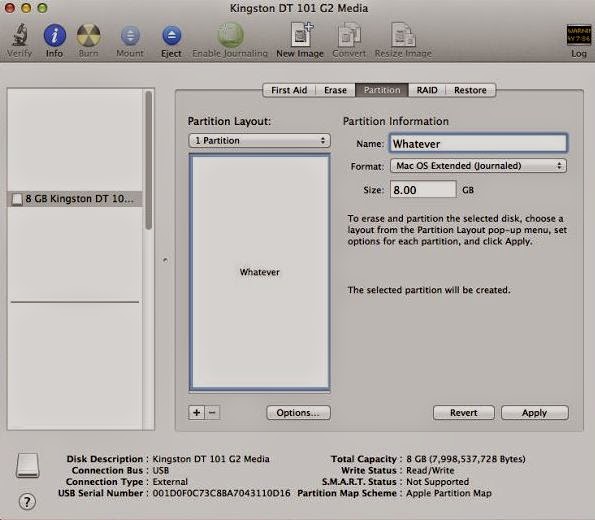
Follow this step if you're setting up ML2 on a Mac or existing Hackintosh. Plug your USB drive into Mac OS X, and open Disk Utility (located in the Utilities folder in the Applications folder). Select the USB drive in the sidebar of Disk Utility, go to the "Partition" tab of Disk Utility, and create a new partition layout with 1 partition. Set the format to "Mac OS Extended (Journaled)". Name the new partition anything you want. Click the "Options" button before applying your new partition layout. It should be set to "Master Boot Record" by default. Keep the same.Now click Apply. See Image Now start Transmac , In the left pane, right click the USB Drive and select Restore with Disk Image Point to your .dmg file and click Open. This will write all of the contents of the ML2 disk image onto your USB drive. It will take 15 minutes to an hour, depending on the quality of your USB drive Once done with tra...